Messages sent to and from Service Broker Services (or
Conversation Endpoints)
must conform to a particular Message Type and
Contract.
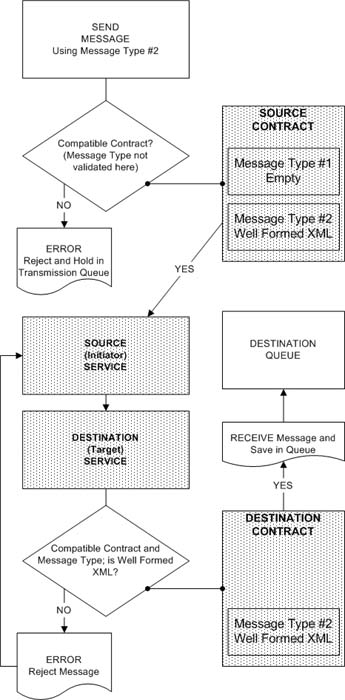
Message Types define the type of data the body of a message must contain (or not contain).
Contracts define who can send messages (the initiating or target
Conversation Endpoint)
of a particular Message Type. Each contract must contain at least one Message Type. So, when two services send
messages to each other, they do so by agreeing to communicate via the terms of a Contract, which contains rules
regarding which Message Types can be sent from one Conversation Endpoint to another. Always remember that every message
is tied to exactly one Message Type. So, you can use the term Message Type and Message interchangeably. Dialogs,
on the other hand, are tied to exactly one Contract. Messages themselves are not tied to a particular Contract.
Rather, it's the Dialog Conversations that they are sent through that are tied to Contracts.
Message Types are validated against when they're received by a Service Broker Service. Validation, in this context,
refers to validating the type of data a message's body contains (or does not contain).
If the incoming message (at the target) does not conform to the contract's allowable message types, an error message
is generated (where and what type of error message varies considerably and depends on many factors; explained below).
In other words, not only must the message's body pass the Message Type's validation requirements, but
it must also be one of the Contract's allowable Message Types. Each message sent must conform to one Message Type and
that Message Type must be part of a matching Contract. Contracts are tied to dialogs and each message sent is done so
through the means of a Dialog Conversation.
There are four types of Message Type validation:
None - any type of message body is acceptable.
Empty - only an empty message body is acceptable.
Well Formed XML - only a message body with valid XML is acceptable.
Well Formed XML with Schema Collection - only a message with valid XML and XML schema is acceptable.
Special consideration should be taken when dealing with Message Type related exceptions and
Dialogs. When you send messages,
you do so as part of an existing Dialog Conversation: you create a dialog and then send one or messages
through that dialog. When a Message Type related exception occurs, the state of the dialog is affected.
After an exception is encountered, any further attempts to send a message through the dialog are prevented,
and this applies to both conversation endpoints of the dialog (initiator and target).
In a non-transaction scenario, if you send three messages and the first contains a body that violates a Message
Type's requirements, an exception will not get thrown until you attempt to send the second message. That's because
by the time you reach the second message, the dialog on which the first message was sent has been placed into an
error state. So, when you attempt to send the second message, this state is recognized and an exception is thrown
accordingly.
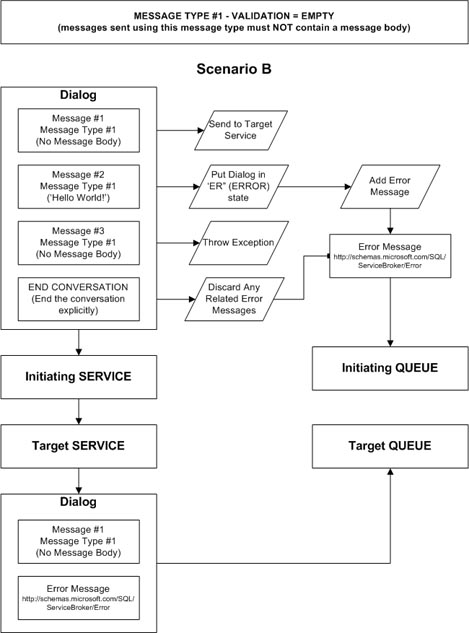
If you send three messages and the second contains a body that violates a Message Type's requirements, an
exception will not get thrown until you attempt to send the third message. However, since the first message
did not violate its assigned Message Type requirements, it will arrive at the target Endpoint's service. Also, an
exception related error message, of message type http://schemas.microsoft.com/SQL/ServiceBroker/Error
will also be sent to the target Endpoint's service automatically. Both the successful message and
the error message will belong to this type of Dialog Conversation.
In a non-transaction scenario, if a message fails validation, an error message of type
http://schemas.microsoft.com/SQL/ServiceBroker/Error will also get added to the initiator's queue
if the dialog to which it belongs has not already been explicitly ended. When Service Broker detects an
error, it doesn't end the dialog, it simply puts it in an error state, and it's up to you to explicitly end the
dialog conversation - either from the initiating Endpoint's service or the target Endpoint's service
(and only if a message was sent to the target Endpoint to begin with). Messages in queues will remain there if
1) their associated dialogs have not been explicitly ended,
or 2) you RECEIVE the messages (and the queue's retention setting is OFF).
It's important to recognize how different scenarios might bring about different behaviors when it comes to
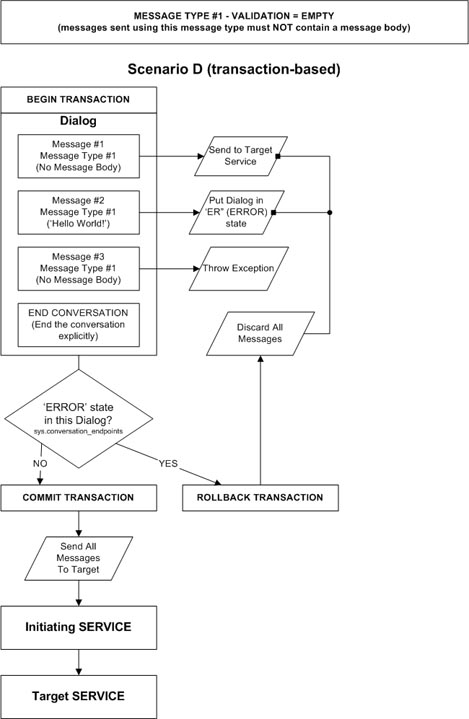
Message Type related exceptions/errors. Here are three as an example:
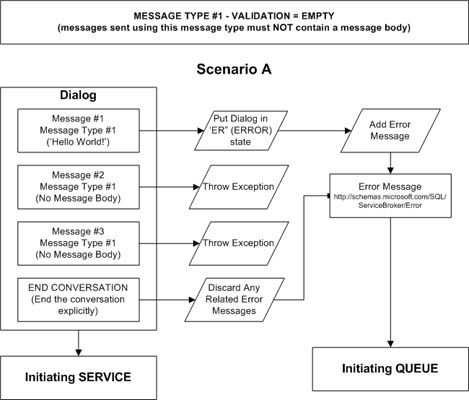
In Scenario A, no messages get sent to the target Endpoint's Service because there are no previous messages that pass
validation. In Scenario B, only the first valid message gets sent to the target while the rest throw exceptions.
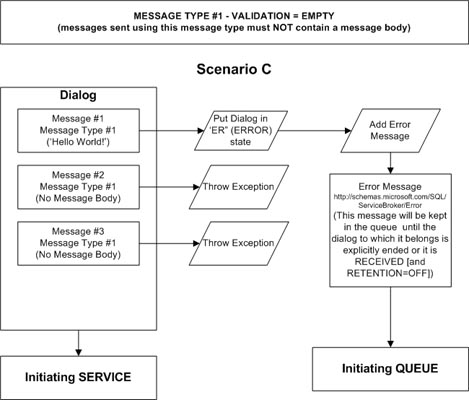
In Scenario C, we have the exact same situation as Scenario A, except for the fact that the error message that was
automatically generated by Service Broker is retained in the initiator's queue because the dialog to which it belongs
was not explicitly ended.
Please take note that scenarios A, B and C make use of no explicit transactions. This means that each statement is
implicitly enlisted within its own transaction. Therefore, any one exception will not affect the entire script of
statements as a whole. I do not recommend using non-transaction based approaches. Rather, use an all-or-nothing
approach by enlisting all messages in a single transaction. That way, if an error occurs anywhere, no messages get
sent to the target. I wouldn't want some messages to get sent and some not. Scenario D illustrates this approach.
In order to accurately determine if an error occured for a given dialog, query the
sys.conversation_endpoints catalog view for that dialog and evaluate the state and/or
state_desc columns. Make sure you query the view BEFORE the dialog conversation is ended
(either explicitly or implicitly).Otherwise, once a dialog conversation is ended, the view no longer contains a
reference to the dialog. If at least one message is sent to the target Endpoint's Service, as in Scenario B above,
a record will exist in sys.conversation_endpoints in the target Endpoint's database for the same dialog
conversation. Dialogs can be tracked across Service Broker service boundries via the conversation_id value.
You won't be able to determine if an individual message has failed validation. Rather, you will only be able to tell
if the dialog, as a whole, has failed - and even one or more messages may have gotten through to the target in that case
(unless all messages were rolled back as part of a transaction). If the Initiating Endpoint and Target Endpoint are using
the same Service, there will exist two sys.conversation_endpoints records: one for the Initiating Endpoint and
one for the Target Endpoint.
I'll be discussing more about exception handling in a another article, but for now, just remember that an exception
may not always be thrown when a message does not pass its Message Type validation requirements.
Example, Detecting Dialog Errors (used Scenario D pattern)
DECLARE @DialogHandle uniqueidentifier,
@BrokerGUID uniqueidentifier,
@ConvID uniqueidentifier;
SELECT @BrokerGUID = service_broker_guid
FROM sys.databases
WHERE database_id = DB_ID('DotNetFun2');
BEGIN TRAN
BEGIN TRY
BEGIN DIALOG CONVERSATION @DialogHandle
FROM SERVICE DotNetFunService
TO SERVICE 'DotNetFun2Service', @BrokerGUID
ON CONTRACT DotNetFunContractSentByAny;
SEND ON CONVERSATION @DialogHandle
MESSAGE TYPE DotNetFunMessageTypeValidateEmpty
('Oops, the body needs to empty!');
-- Retrieve the Conversation ID - which is unique across Service
-- boundries for each dialog (we don't need it; we can use
-- the conversation_handle; however, conversation_id will be
-- the same at the target for this dialog - if any messages
-- arrived there):
SELECT @ConvID = conversation_id
FROM DotNetFun.sys.conversation_endpoints
WHERE conversation_handle = @DialogHandle;
-- If the dialog is in an error state, throw an actual exception,
-- or do something else:
IF EXISTS(SELECT * FROM DotNetFun.sys.conversation_endpoints
WHERE state = 'ER' AND conversation_id = @ConvID)
RAISERROR('A dialog error has occured....', 1, 127);
ELSE
BEGIN
-- Make sure you end the conversation AFTER looking for error
-- conditions; otherwise, those conditions/records will not
-- exist for this dialog once you end it accordingly; or,
-- don't end it at all - the point is to not end the dialog
-- before checking for the error conditions:
END CONVERSATION @DialogHandle;
COMMIT TRAN;
END
END TRY
BEGIN CATCH
ROLLBACK TRAN;
DECLARE @ERRMSG VARCHAR(MAX);
SET @ERRMSG = ERROR_MESSAGE();
RAISERROR(@ERRMSG, 18, 127);
END CATCH

 Current .Net Version: 2.0.50727